🚗 【Smart In-Car HUD Co-Pilot】Works on Sedans, SUVs, Pickups, RVs, and More!
🚗 【Smart In-Car HUD Co-Pilot】Works on Sedans, SUVs, Pickups, RVs, and More!
Couldn't load pickup availability
-
Ordered
- - -
Order Ready
- - -
Delivered

🚗 【Smart In-Car HUD Co-Pilot】Works on Sedans, SUVs, Pickups, RVs, and More!
Keep Navigation Higher. Charge Your Phone While You Drive.
A compact dashboard phone projection stand that reflects compatible smartphone navigation onto a transparent panel while providing convenient Qi wireless charging for compatible phones.

This product does not contain an independent AI assistant, AR navigation system, radar system or built-in GPS navigation. Navigation information comes from your smartphone. The transparent panel reflects compatible phone content into a higher viewing position.
Phone Navigation Projection
Reflect compatible navigation information from your smartphone.
Qi Wireless Charging
Charge compatible phones while resting on the base.
Adjustable Viewing Angle
Fine-tune the transparent panel for comfortable viewing.
Stable Dashboard Setup
Anti-slip phone surface with adhesive mounting support.
One Compact Accessory. Three Useful Functions.
Instead of installing a complicated electronic navigation system, this dashboard accessory works together with the smartphone you already use every day.
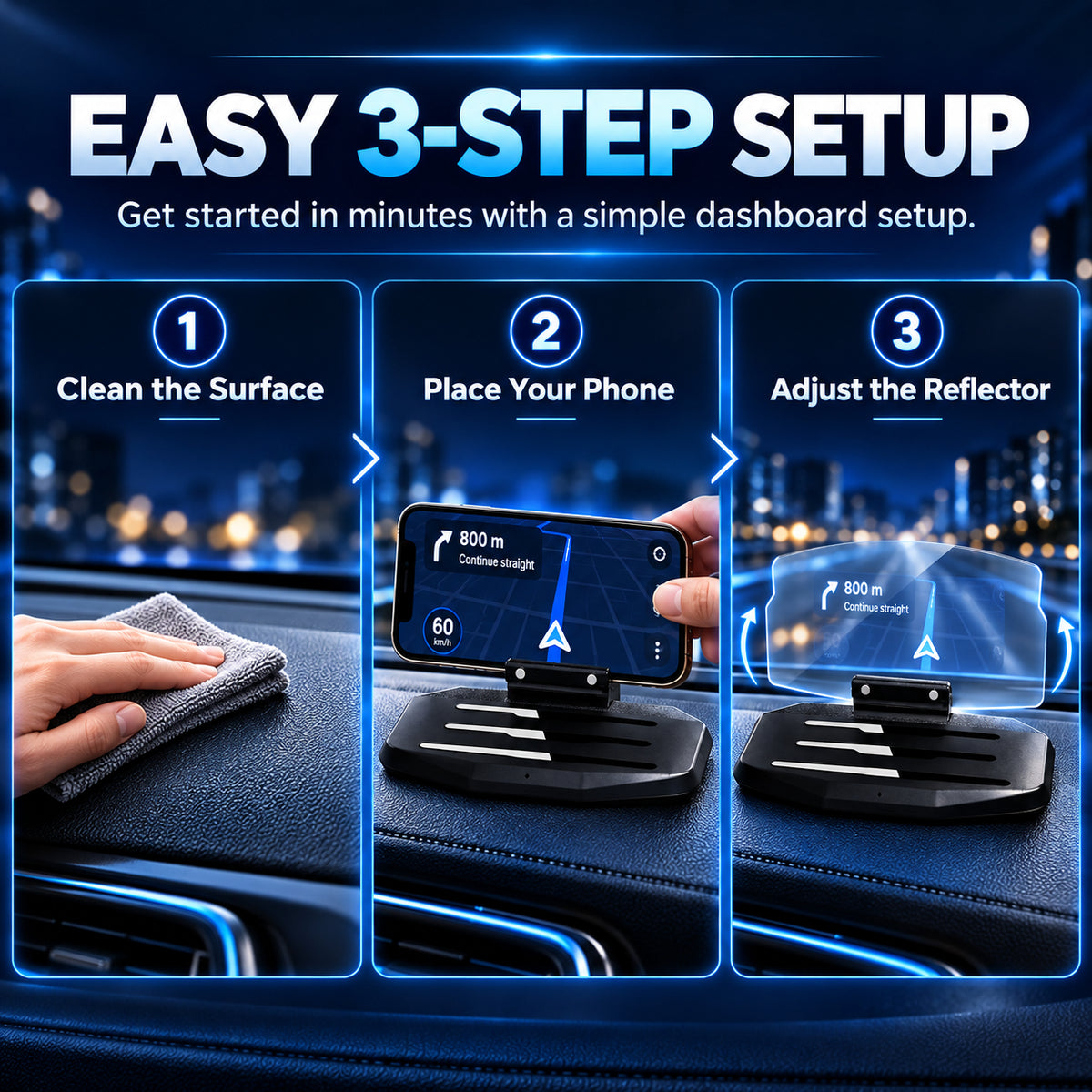
Place your phone on the base, open your preferred compatible navigation application and adjust the transparent reflector until the information is comfortable to see.

⚡ Qi Wireless Charging Built Into the Base
For compatible smartphones, the charging version allows you to place your phone directly on the designated charging area. That means fewer cables around your dashboard and less plugging and unplugging during everyday use.
- Supports Qi-compatible wireless charging smartphones
- Designed for many phones up to approximately 6.5 inches
- Charging efficiency reference value ≥90%
- Power reference: 5V / 1–1.5A

↕ Adjustable Angle & Stable Phone Placement
The transparent reflector offers approximately 15° of adjustment so you can fine-tune its position according to your seating position and dashboard layout.
Anti-slip strips on the phone area help reduce unwanted movement, while the adhesive mounting configuration helps secure the base to a suitable dashboard surface.
- Approximately 15° viewing adjustment
- Transparent PMMA reflector panel
- Textured anti-slip phone resting area
- Compact dashboard footprint
- Adhesive mounting support

Set Up in 3 Easy Steps

Product Specifications
| Product Type | Dashboard Phone Projection & Wireless Charging Stand |
| Main Functions | Smartphone reflection display, phone stand and Qi-compatible wireless charging |
| Navigation Source | Smartphone navigation application |
| AI Function | No |
| AR Function | No |
| Independent GPS | No |
| Wireless Charging | Compatible Qi-enabled smartphones |
| Charging Efficiency | ≥90% reference value |
| Power Reference | 5V / 1–1.5A |
| Material | ABS + PMMA + steel components |
| Approx. Dimensions | 159.76 × 97.46 × 91.68 mm |
| Angle Adjustment | Approximately 15° |
| Installation | Dashboard placement / adhesive base configuration |
| Recommended Phone Size | Up to approximately 6.5 inches for wireless charging configuration |

Package Contents
- 1 × Dashboard Phone Projection Stand
- 1 × USB Charging Cable
- 1 × Adhesive Dashboard Base
- 1 × User Guide
What This Product Does — And What It Does Not Do
- Reflects compatible smartphone navigation content
- Supports wireless charging for compatible Qi smartphones
- Works as a convenient dashboard phone holder
- Navigation information comes from your smartphone
- Does not contain an AI driving assistant
- Does not generate AR navigation
- Does not include independent GPS navigation
- Does not detect nearby cars, pedestrians or obstacles
- Does not independently detect radar or speed cameras
Frequently Asked Questions
Does this product have AI functions?
No. This product does not have an AI driving assistant. Your smartphone provides the navigation information.
Does it have AR navigation?
No. The product does not generate augmented-reality navigation. It reflects compatible information shown on your smartphone.
Does it have built-in GPS?
No. Navigation comes from the GPS and navigation application on your smartphone.
Does it support wireless charging?
Yes. The wireless charging version supports compatible Qi-enabled smartphones.
Will wireless charging work through a phone case?
Some thin Qi-compatible cases may work. Thick, metal or certain magnetic cases can interfere with wireless charging.
What phone size is recommended?
The supplied product information recommends phones up to approximately 6.5 inches for the wireless charging configuration.
Can the transparent display be adjusted?
Yes. The reflector has an approximately 15° adjustment range to help you find a comfortable viewing angle.
How is the product installed?
Position it on a clean, suitable dashboard surface. The strengthened mounting configuration can use an adhesive base for added stability.
Can it be used as a regular phone holder?
Yes. The base can also function as a convenient dashboard phone stand.
Does it detect speed cameras or other vehicles?
No. The product itself does not detect speed cameras, vehicles, pedestrians or road hazards. Any alert shown would come from the application running on your smartphone.
Will every navigation application work?
Compatibility can vary by phone, operating system and application. A mirrored or projection-friendly display mode is recommended.
Store Service
Trackable shipping on eligible orders.
Secure payment processing through our checkout.
Eligible returns follow our current return policy.
Contact our support team if you need assistance.
Shipping, Returns & Safe Use
- Please confirm your shipping address before checkout.
- Delivery times vary depending on destination and shipping method.
- Returns and exchanges follow the store's current published return policy.
- Wireless charging requires a compatible Qi-enabled smartphone.
- Charging speed can vary depending on phone model, case thickness and power source.
- Projection visibility can vary depending on sunlight, screen brightness and reflector angle.
- Install and adjust the product only while the vehicle is safely parked.
- Do not position the product where it blocks the driver's view, airbags, instruments or vehicle controls.
- Never interact with your smartphone in a distracting manner while driving.
- Always follow local traffic, windshield accessory and distracted-driving laws.
- Please review our Shipping Policy, Return Policy, Privacy Policy and Terms of Service before ordering.
🚗 Navigation. Charging. Phone Holding.
One compact dashboard accessory that works together with the smartphone you already use — without exaggerated AI or AR claims.