HD TV Antenna – No Subscription, Easy Setup📡📺
Couldn't load pickup availability
-
Ordered
- - -
Order Ready
- - -
Delivered
HD TV Antenna – No Subscription, Easy Setup📡📺
Watch Available Local TV
Without A Monthly Antenna Fee
A compact indoor TV antenna designed to receive available over-the-air digital broadcasts including local news, weather, entertainment and other channels available in your area.
Pick Up Local Broadcasts With A Simple Antenna Setup
Connect the antenna to your television's coaxial input, position it where reception is strongest, then run a channel scan through your TV settings to discover the local stations available at your location.
An Easy Way To Expand Your Local TV Options
Channel availability depends on your location and local broadcasters.
Local TV Broadcasts
Receive available over-the-air stations that may include local news, weather, sports and entertainment programming.
No Recurring Antenna Subscription
Over-the-air television broadcasts do not require a monthly cable or antenna subscription to receive where the channels are freely available.
Long-Range Design
Designed to help capture available broadcast signals over extended distances when placement and local reception conditions are favorable.
HD Broadcast Viewing
Compatible digital broadcasts can display in clear HD quality when your television and local broadcast signal support it.
Designed For Signals
Up To 120 Miles Away
The product listing advertises reception capability of up to approximately 120 miles under favorable conditions. Actual reception distance varies significantly depending on local terrain, broadcast tower strength and antenna placement.
Discover What's Broadcasting Near You
Clear Picture When The Signal Is Strong
When a compatible local station is broadcasting in HD and reception conditions are good, your television can display a clear digital picture without using a cable box.

Use It In More Than One Type Of Space

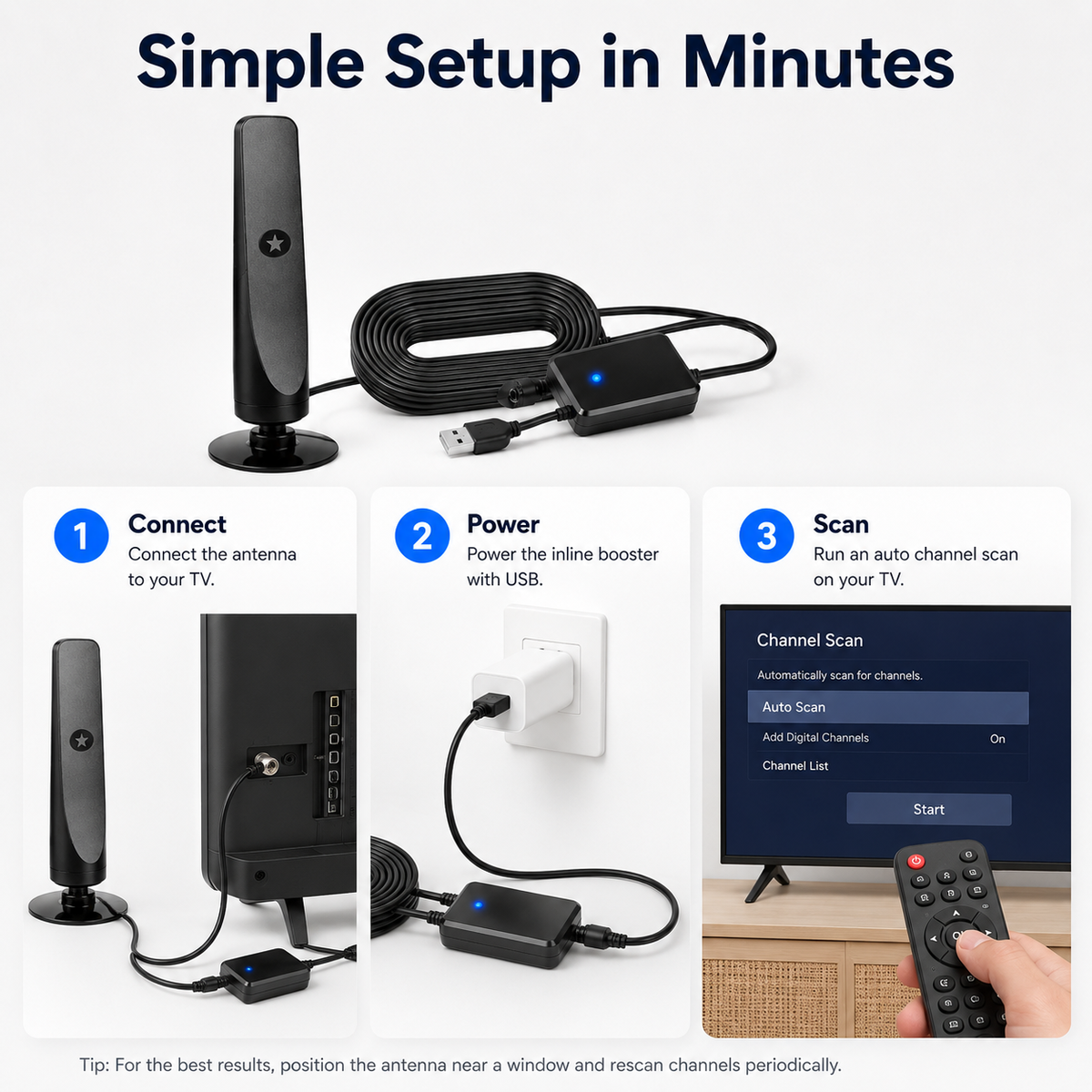
Connect. Position. Scan.
Connect To Your TV
Connect the antenna cable to your television's standard coaxial antenna input.
Choose Antenna Mode
Open your television's input or broadcast settings and select Antenna / Air as the signal source.
Position The Antenna
Place the antenna where reception is strongest, often near a window or higher indoor position.
Run A Channel Scan
Use your TV's channel-scan function to search for available over-the-air broadcasts.
Small Position Changes Can Affect Reception
If you receive fewer channels than expected, reposition the antenna and run the channel scan again. A window-facing or higher location may improve reception in some homes.
Works With Most TVs With A Coaxial Antenna Input
Most modern digital televisions include a standard coaxial antenna input. Older analog-only televisions may require a separate digital converter box.

Why Add An Indoor TV Antenna?

What You Need To Know
Reception Tips
• Channel availability varies by geographic location.
• Place the antenna as high as practical and test different locations.
• A position near a window may improve reception in some buildings.
• Run a new channel scan after changing the antenna position.
• Hills, trees, buildings, metal structures and distance from broadcast towers may reduce signal strength.
• The advertised maximum range is not a guaranteed reception distance.
Frequently Asked Questions
Do I need a monthly subscription?
How do I install it?
Will it work with my TV?
How many channels will I receive?
Does it really receive signals from 120 miles away?
What if I am missing channels?
Can I use it in an RV or camper?
See What's Broadcasting Near You
Connect to your TV, find the best antenna position and scan for available local digital broadcasts without a recurring antenna subscription.

- 5 stars: 33 (83%)
- 4 stars: 6 (15%)
- 3 stars: 1 (3%)
- 2 stars: 0 (0%)
- 1 star: 0 (0%)
I connected it to the TV and ran a channel scan without much trouble. Placement made a difference but once I found a good spot the setup was straightforward.
Thanks for sharing! We're glad the setup was straightforward and that you found a placement that works well.
I wanted a simple way to watch available over-the-air channels without adding another monthly service. After scanning the TV I was able to see what was available in my area.
I put this on a second television that did not need cable. It was easy to connect and works well for the local stations I can receive from my location.
I mainly wanted local broadcasts without paying for another TV package. The antenna was easy to add to my existing television and the channel scan only took a few minutes.
The first spot I tried did not pick up much. Moving it closer to a window improved the results quite a bit so it is worth testing a few positions.
The available stations come through clearly on my TV once the antenna is positioned correctly. I like having a basic no-subscription option for local viewing.
We're happy to hear you're enjoying the picture quality on the channels available in your area. Thank you!
I tried this in two different rooms before deciding where to keep it. The lightweight design made it easy to experiment with placement and signal strength.
I normally stream most things but like having another way to access local broadcasts. This gives me a useful backup without needing a separate subscription.
I moved the antenna closer to the window and ran the channel scan again. That made a noticeable difference and the setup has been stable since then.
I did not want a large outdoor antenna in my apartment. This is much easier to manage indoors and lets me check which local channels are available where I live.
I plugged it in selected the antenna input and ran the TV scan. The whole process was simpler than I expected and did not require another device.
I mainly wanted access to local news and weather broadcasts. Reception depends on where I place it but I found a spot that works well in my home.
Our guest room TV does not get used enough to justify another paid service. This gives guests a simple way to watch available local channels.
I first placed it behind the television and the results were mixed. Moving it higher and closer to a window gave me a more consistent signal.
There was not much to figure out beyond connecting it and scanning for channels. I like that it is a simple option without another monthly bill.
Thanks for the feedback! We're glad the antenna has been a simple and practical addition to your TV setup.
I added this to a small television in the kitchen. It is convenient for catching local morning shows and news without needing a streaming box there.
I do not watch enough television to pay for a full package. This works well for checking the free local channels available in my area.
It took a few tries to find the best position but once I did the channels I receive look clear. I would definitely recommend testing different locations.
We use this at a small weekend place where we did not want another cable bill. It gives us access to whatever local broadcasts are available there.
My TV recognized the antenna input right away. I ran an automatic scan and then moved the antenna slightly to improve the reception.
I wanted something simple for a television that is mostly used for local programming. This has been easier than setting up another streaming account.
When our internet was down I was glad to have access to local over-the-air broadcasts. It is a nice backup to keep connected to the TV.
Reception was better upstairs than downstairs in my house. Once I found the right room and placement the setup worked nicely for local stations.
I use this mostly when there is something airing on a local station. It is convenient to have that option available without changing my normal streaming setup.
I helped my parents connect this to their television and the process was pretty straightforward. We tested a few spots before settling on the best one.
We're glad the setup went smoothly for your parents. Testing a few placements can make a real difference with over-the-air reception.
I have a small TV in my home office and did not want to pay for another service. This gives me access to available local channels with minimal setup.
I like that this does not require mounting a large antenna outside. It fits easily near the TV and is simple to reposition when needed.
Signal strength changed depending on where I placed it in the room. Once I found a better location the viewing experience improved a lot.
I wanted a way to access local weather updates directly on the TV. This has been a practical addition to my setup.
There are no complicated controls to learn. Connect it scan the TV and then adjust the placement if needed. That simplicity is what I wanted.
I did not want to add another cable box upstairs. This was an easy way to make the bedroom TV more useful for local broadcasts.
It worked better in one part of my apartment than another. Once I moved it closer to an exterior wall the signal improved.